Make Smartsheet update itself — from SAS/R, no AI
A deterministic, no-AI companion that lets a biostatistician keep a Smartsheet program tracker perfectly current automatically — from the validated SAS and/or R you already run on schedule. No copy-paste, no manual status updates, no new vendor, and no PHI egress. It ships with a ready-to-use SAS/R helper library.

The 60-second version
- A scheduler (Task Scheduler / cron) fires a version-controlled SAS or R program after your nightly extract refreshes.
- The program builds an ops-only snapshot (milestone dates, deliverable/QC status, % complete, aggregate counts, ownership) and upserts it to Smartsheet by a stable key — updating rows in place, never duplicating.
- A Smartsheet Automation you set up once — “when Status changes to At Risk → alert the PM” — fires the email / mobile push / Teams or Slack message.
- The job fails loud on any error and ends with a heartbeat, so a stale tracker can never masquerade as a fresh one.
See it end-to-end in The tracker that updates itself — one nightly run on Study CP-101.
Why a biostatistician wants this
The program tracker stops being a chore you maintain by hand and becomes a by-product of the pipeline you already run. The numbers on the sheet are exactly the ones your validated programs computed; the PM gets alerted the moment something slips; and because only non-sensitive operational data crosses, there is no new approval gate — just your normal program validation.
The loop — scheduler → SAS/R → Smartsheet cells → Smartsheet alert
Every component already exists. SAS and R talk to the Smartsheet REST API directly; you do not need any add-on product, connector, or middleware.
How SAS talks to Smartsheet
PROC HTTP makes the authenticated REST call (Bearer token in the header); the JSON LIBNAME engine parses the response straight into datasets. A GET on /2.0/sheets/{id} returns the columns and rows; a PUT/POST on /2.0/sheets/{id}/rows updates or appends. The helper library wraps all of this as %ss_* macros.
How R talks to Smartsheet
httr2 builds the request (req_auth_bearer_token(), req_retry() for throttling) and jsonlite handles the bodies; the same operations are ss_colmap(), ss_get_rows(), ss_upsert(). Pin packages with renv; schedule with cronR / taskscheduleR.
| Concern | How the library handles it |
|---|---|
Column ids drift — titles/order can change; only columnId is a stable address. | The column map is rebuilt every run from a fresh GET; values are written by id, never by position. |
| Rate limits — ~300 requests/min/token. | %ss_http / req_retry() retry 429 & 5xx with exponential backoff; batch writes go in one array, not row-by-row. |
| Pagination — large sheets page their rows. | Reads request includeAll=true so the key→row map is complete. |
Everything above is the design. Here is the actual program that runs it, in full: the one file you edit per study, then the nightly job you schedule. It is plain, double-programmed SAS you can read top to bottom, and it is the same code the worked example and the runnable _demo/ exercise.
The one file you edit per study: ss_config.sas
SAS · 22 lines · the real shipped file, in full — nothing elided.
ss_config.sas is the single per-study file a biostatistician edits to point SHEETLINK at one Smartsheet tracker. It holds the sheet and row ids, the join key, the notification recipients, the token location, and the ops-only allowlist, kept separate from the driver so standing up a new tracker is one file change instead of a code edit. It is meant to be %include-ed before the driver runs, so every one of these values is in scope when the upload job executes. Nothing here reads or writes data on its own: it declares constants the rest of SHEETLINK reads, and it is the place where the PHI boundary is defined in code.
/*====================================================================================
  ss_config.sas  -  per-study/per-sheet constants for SHEETLINK. %include before the
  driver. Keeps sheet ids, the key column, recipients, and the OPS-ONLY ALLOWLIST out of
  the code so a new tracker is one file, not a code edit.
====================================================================================*/
%global CFG_SHEET CFG_SUMMARYROW CFG_KEYCOL CFG_KEYCOLNAME CFG_BACKUP CFG_PM
        CFG_ALLOW CFG_TOKEN_ENV CFG_TOKEN_FILE;

%let CFG_TOKEN_ENV  = SMARTSHEET_TOKEN;          /* env var holding the Bearer token   */
%let CFG_TOKEN_FILE = ;                           /* OR a perms-600 file path; leave 1  */

%let CFG_SHEET      = 1234567890123456;           /* the CP-101 Program Tracker sheetId */
%let CFG_SUMMARYROW = 9876543210;                 /* the summary rowId to attach the PDF*/
%let CFG_KEYCOL     = TaskID;                      /* the SAS variable holding the key   */
%let CFG_KEYCOLNAME = Task ID;                     /* the Smartsheet column TITLE        */

%let CFG_BACKUP     = biostat.backup@example.com;  /* fail-loud target                   */
%let CFG_PM         = pm.cp101@example.com;

/* THE OPS-ONLY ALLOWLIST (column titles, UPCASE-insensitive). %ss_guard FAILS LOUD if a
   job tries to write any column not on this list -> the in-code PHI / sensitive boundary. */
%let CFG_ALLOW = TASK ID|STATUS|% DONE|OWNER|DUE|TASK;
Walkthrough, part by part
File header and role. The opening comment block states the contract: this file holds per-study and per-sheet constants for SHEETLINK and is meant to be %include-ed before the driver. It keeps sheet ids, the key column, recipients, and the ops-only allowlist out of the executable code so that adding a new tracker is a single configuration edit, not a code change. Reading this header first tells the biostatistician exactly which knobs live here and that everything downstream depends on these values being set correctly.
The %global declaration block. The %global statement promotes all nine SHEETLINK settings (CFG_SHEET, CFG_SUMMARYROW, CFG_KEYCOL, CFG_KEYCOLNAME, CFG_BACKUP, CFG_PM, CFG_ALLOW, CFG_TOKEN_ENV, CFG_TOKEN_FILE) to the global symbol table. This matters because the file is %include-ed rather than called as a macro, so declaring the names global up front guarantees the driver and the downstream macros can resolve every one of them regardless of where the include happens. Note that CFG_TOKEN_FILE is the one setting deliberately left with an empty value, and the global scope makes each of these nine names visible to the rest of SHEETLINK once the file runs.
CFG_TOKEN_ENV and CFG_TOKEN_FILE: where the Bearer token lives. These two settings tell SHEETLINK how to authenticate to the Smartsheet API without ever writing the credential into source. CFG_TOKEN_ENV names the environment variable that holds the Bearer token (default SMARTSHEET_TOKEN), and CFG_TOKEN_FILE is the alternative: a path to a permissions-600 file, left blank here so the env-var path is used. The comment instructs you to leave exactly one of the two populated, so the token is sourced from a single well-defined place. Keeping the secret out of the config file means this file can be reviewed and version-controlled safely.
CFG_SHEET and CFG_SUMMARYROW: the sheet and row targets. CFG_SHEET is the numeric Smartsheet sheetId of the target tracker (the placeholder points at the CP-101 Program Tracker), and it is the sheet every upsert writes into. CFG_SUMMARYROW is the specific rowId on that sheet to which the generated PDF is attached, per its inline comment. These are literal Smartsheet object ids, so a biostatistician standing up a new tracker replaces both placeholders with the ids from their own sheet. Getting the sheetId wrong points the whole job at the wrong tracker, so this is the first pair to verify.
CFG_KEYCOL and CFG_KEYCOLNAME: the join key on both sides. These two settings define the key that matches a SAS row to a Smartsheet row so updates are idempotent rather than duplicating rows. CFG_KEYCOL is the name of the SAS variable holding the key (TaskID), while CFG_KEYCOLNAME is the Smartsheet column TITLE it maps to (Task ID). The two differ because SAS variable names cannot contain spaces but Smartsheet column titles can, so both forms are needed: one to read the value out of the dataset, the other to find the matching column in the sheet. If either is mismatched, the upsert cannot locate its target and the join breaks.
CFG_BACKUP and CFG_PM: the notification recipients. CFG_BACKUP is the fail-loud target (the address that gets notified when the job cannot complete), so a broken sync surfaces to a person instead of failing silently. CFG_PM is the project manager address for the CP-101 tracker. Both are ordinary email addresses swapped per study. The fail-loud design means a failed push is treated as an incident to be seen, consistent with the principle that this pipeline should never quietly drift out of sync.
CFG_ALLOW: the ops-only allowlist and the in-code PHI boundary. CFG_ALLOW is a pipe-delimited list of Smartsheet column titles that this job is permitted to write, compared case-insensitively: here TASK ID|STATUS|% DONE|OWNER|DUE|TASK. Its comment is explicit that %ss_guard FAILS LOUD if a job tries to write any column not on this list, which makes this line the in-code PHI and sensitive-data boundary. Every allowed column is operational metadata (task identity, status, percent done, ownership, due date), so the list structurally prevents this cloud-bound sync from ever carrying PHI, participant-level, unblinded, or reported clinical numbers. Reported clinical results come only from validated tools, never from this sheet, and this allowlist is what enforces that separation at run time: adding a clinical column here would be the single edit that breaks the boundary, so it is the line to review most carefully.
The nightly job you schedule, every line: tracker_update.sas
SAS · 50 lines · the real shipped file, in full — nothing elided.
tracker_update.sas is the nightly SHEETLINK driver: the top-to-bottom SAS job you schedule (cron, Windows Task Scheduler, or SAS batch) to run after your validated nightly extract has refreshed. It pushes the ops-only status of the CP-101 program tracker to Smartsheet idempotently, then lets Smartsheet's own configured workflow send the notifications. Everything it writes is operational (status, % complete, ownership, dates), never PHI, participant-level, unblinded, or reported clinical numbers. The header comment states the flow explicitly: config, macros, init, build ops-only labeled data, upsert, optional status-PDF attach, then heartbeat, with a fail-loud posture throughout.
/*====================================================================================
  tracker_update.sas  -  the nightly SHEETLINK driver. Schedule this (cron / Task
  Scheduler / SAS batch) AFTER your validated nightly extract refreshes. It pushes the
  ops-only status of the CP-101 program tracker to Smartsheet, idempotently, then lets
  Smartsheet's own configured workflow send the notifications.
  ------------------------------------------------------------------------------------
  Flow : config -> macros -> init -> build ops-only data (LABELED) -> upsert -> (attach
         a status PDF) -> heartbeat.  No PHI. No participant-level data. Fail loud.
====================================================================================*/
%let ROOT = /sasdata/cp101/sheetlink;          /* adjust to your install */
%include "&ROOT/ss_config.sas";
%include "&ROOT/ss_macros.sas";

/* 1) connect: token from env (never hard-coded/logged), fail-loud target, allowlist */
%ss_init(tokenenv=&CFG_TOKEN_ENV, tokenfile=&CFG_TOKEN_FILE, backup=&CFG_BACKUP, allow=&CFG_ALLOW);

/* 2) BUILD THE OPS-ONLY SNAPSHOT from your validated derived data.
      One row per tracked task; the key (&CFG_KEYCOL) is a stable code YOU own.
      Each value variable is LABELED with its exact Smartsheet column title.
      >>> Only operational columns. No PHI, no participant-level, no reported clinical numbers. */
data tracker;
  length TaskID $40 Status $20 Owner $40 Due $10;
  /* example: derive these from your milestone / deliverable / QC-status tables */
  TaskID="CP101-DBL";   Status="At Risk";  PctDone=0.60; Owner="Biostat"; Due="2026-06-20"; output;
  TaskID="CP101-ADaM";  Status="On Track"; PctDone=0.85; Owner="Biostat"; Due="2026-06-28"; output;
  TaskID="CP101-TLF";   Status="Watch";    PctDone=0.40; Owner="Biostat"; Due="2026-07-05"; output;
  label Status="Status" PctDone="% Done" Owner="Owner" Due="Due";   /* labels = Smartsheet TITLES */
run;

/* 3) IDEMPOTENT upsert by TaskID: existing rows update in place, new rows append.
      Re-runnable any number of times a night with no duplicates. */
%ss_upsert(sheet=&CFG_SHEET, keycol=TaskID, keycolname=&CFG_KEYCOLNAME, data=tracker);

/* 4) (optional) attach last night's one-page status PDF to the summary row.
      Rate-intensive - do it once per run, not per row. Ops-only document. */
%if %sysfunc(fileexist(&ROOT/out/cp101_status.pdf)) %then %do;
  %ss_attach(sheet=&CFG_SHEET, row=&CFG_SUMMARYROW, file=&ROOT/out/cp101_status.pdf, name=CP101_status.pdf);
%end;

/* 5) NOTIFICATIONS are NOT sent from code. Configure them ONCE in Smartsheet:
        Automation -> "When Status changes to At Risk -> Alert the PM".
      SAS just writes the truthful cell; Smartsheet decides who to tell. (Pattern A.)
      For a targeted human-in-the-loop ask, you MAY send an update request: */
/* %ss_update_request(sheet=&CFG_SHEET, rowids=&CFG_SUMMARYROW, colids=...,
                      sendto=&CFG_PM, subject=CP101 weekly check,
                      message=Please confirm the DB-lock date.); */

/* 6) heartbeat: prove the job ran (so silence is unambiguously a failure, not a no-op) */
%ss_assert(cond=(&SS_RC=0), msg=SHEETLINK finished with errors - see log);
%put NOTE: [SHEETLINK] tracker_update complete, status=&SS_STATUS;
Walkthrough, part by part
Header and includes: set ROOT and pull in config plus the macro library. The opening block comment documents the job's purpose and flow, then %let ROOT = /sasdata/cp101/sheetlink defines the install path you must adjust to your own layout. Two %include statements pull in &ROOT/ss_config.sas (which supplies the &CFG_* macro variables used below) and &ROOT/ss_macros.sas (which defines %ss_init, %ss_upsert, %ss_attach, and %ss_assert). Splitting configuration and macros out of the driver keeps this file readable as the whole job at a glance and lets you point one driver at different studies by swapping the config. Nothing runs until these resolve, so a missing or misnamed include fails immediately rather than silently.
Step 1, ss_init: connect with the token from the environment and load the allowlist. %ss_init(tokenenv=&CFG_TOKEN_ENV, tokenfile=&CFG_TOKEN_FILE, backup=&CFG_BACKUP, allow=&CFG_ALLOW) establishes the Smartsheet connection using a token drawn from the environment variable (or token file) named in config, so per the inline comment the secret is never hard-coded or written to the log. The backup= argument names the fail-loud target, and allow=&CFG_ALLOW loads the column allowlist. That allowlist is the in-code PHI boundary: it enforces which columns may ever be written, so operational fields pass and anything participant-level or clinical is refused before it can reach the cloud. Running init first means the guard and connection are in place before any data is built or pushed.
Step 2, build the ops-only snapshot in the tracker data set. The data tracker step builds one row per tracked task, where the length statement types TaskID (the stable key code you own, matching &CFG_KEYCOL), Status, Owner, and Due as character, while PctDone is numeric by assignment. The three hard-coded example rows (CP101-DBL at 0.60, CP101-ADaM at 0.85, CP101-TLF at 0.40) are placeholders: in production you derive these from your validated milestone, deliverable, and QC-status tables, as the inline comment directs. The final label statement is load-bearing because each label is the exact Smartsheet column title the upsert writes into (Status, % Done for PctDone, Owner, Due), and note TaskID is left unlabeled because it is the match key. Every variable here is operational only: no PHI, no participant-level records, and no reported clinical numbers, which by policy come from validated tools and never from this sheet.
Step 3, ss_upsert: idempotent match-on-TaskID push. %ss_upsert(sheet=&CFG_SHEET, keycol=TaskID, keycolname=&CFG_KEYCOLNAME, data=tracker) writes the tracker snapshot to the configured sheet, matching rows on TaskID against the Smartsheet key column named by &CFG_KEYCOLNAME. Per the inline comment, existing rows update in place and previously unseen keys append as new rows, so the operation is idempotent: you can run it any number of times a night and never create duplicates. This is what makes the whole driver safe to re-run after a partial failure or a re-triggered schedule. It also means the sheet always reflects the latest validated extract rather than accumulating stale copies.
Step 4, ss_attach: optionally attach the one-page status PDF, guarded by fileexist. The %if %sysfunc(fileexist(&ROOT/out/cp101_status.pdf)) block runs %ss_attach(sheet=&CFG_SHEET, row=&CFG_SUMMARYROW, file=&ROOT/out/cp101_status.pdf, name=CP101_status.pdf) only when last night's status PDF actually exists, so a missing report skips the attach cleanly instead of erroring. The attachment goes once to the summary row (&CFG_SUMMARYROW), not per data row, because the comment flags attaching as rate-intensive against the API. The comment also marks the PDF as an ops-only document, consistent with the no-PHI boundary: it is a status summary, not participant data. This step is optional and non-fatal, so the job proceeds even when no PDF was produced.
Step 5, notifications are configured in Smartsheet, not sent from code. This step is documentation, not executable logic: it states that alerts are configured once in Smartsheet's own Automation (for example, when Status changes to At Risk, alert the PM) rather than fired from SAS. The division of labor is deliberate: SAS writes only the truthful operational cell and Smartsheet decides who to tell (called Pattern A here), which keeps notification routing out of the batch job. A commented-out %ss_update_request call shows the one sanctioned exception, a targeted human-in-the-loop update request that passes sheet=&CFG_SHEET, rowids=&CFG_SUMMARYROW, and sendto=&CFG_PM to ask the PM to confirm the DB-lock date, which you can uncomment and complete when you genuinely need a person to respond. Left commented, it does nothing on a normal run.
Step 6, ss_assert heartbeat: fail loud and prove the job ran. %ss_assert(cond=(&SS_RC=0), msg=SHEETLINK finished with errors - see log) checks the accumulated return code and hard-fails the job with that message if any prior step set &SS_RC nonzero, enforcing the fail-loud contract so a problem cannot pass silently. The closing %put NOTE: [SHEETLINK] tracker_update complete, status=&SS_STATUS; emits a tagged completion line carrying &SS_STATUS. That heartbeat is what makes scheduling trustworthy: because a healthy run always prints this NOTE, its absence in the log unambiguously signals a failed or non-running job rather than a benign no-op, which is exactly what you want a monitored nightly driver to guarantee.
What a biostatistician should automate
Everything here is operational — status, dates, counts, ownership — the data that belongs on a tracker. None of it is participant-level or clinical.
| Use case | What the nightly SAS/R job writes | The alert Smartsheet then sends |
|---|---|---|
| Deliverable & milestone status | RAG status, % complete, planned vs actual dates for each tracked task (DB lock, ADaM, TLFs, CSR sections), keyed by a stable Task code. | On any task → At Risk: alert the PM and the task owner. |
| QC / double-programming status | Per-output QC state (not started / in progress / passed / discrepancy) rolled up from your validation log. | On a discrepancy logged: notify the QC reviewer; reminder if it ages. |
| Enrollment vs plan (aggregate) | Actual vs planned counts by cohort/site — counts only, never a participant. | On actual falling below plan by a threshold: alert the PM & CRA lead. |
| Timeline & critical-path dates | Forecast vs baseline dates from your project plan; slippage flags. | Smartsheet’s built-in reminders fire N days before each due date automatically. |
| Task ownership & handoffs | Current owner / next action for each row, so coverage is unambiguous. | On owner change or a handoff date: notify the new owner. |
| Run / pipeline health | Last successful run timestamp + record counts (the heartbeat) on a status row. | If the timestamp goes stale, an automation flags the tracker itself as unfresh. |
Notifications: configure once in Smartsheet, not in code
The robust, low-maintenance pattern keeps recipients, channels, escalation, and quiet-hours in Smartsheet — where a PM can edit them without touching your program — and keeps your code about data.
Pattern A — cell change → alert (the default)
- Your job writes
Status = "At Risk"on a row (idempotent, by key). - A Smartsheet Automation — set up once: “When Status changes to At Risk → Alert the PM” — fires the notification (email, mobile push, Teams, Slack).
SAS/R never holds an email list. This is the most maintainable design and the one the worked example uses.
Pattern B — time-based reminders
Smartsheet’s native reminders fire relative to a date cell (“3 days before Due”). Your job just keeps the Due dates honest; Smartsheet handles the calendar. Zero code.
Pattern C — the targeted update request
When you need a specific person to act — “please confirm the DB-lock date” — the library can send a Smartsheet update request (%ss_update_request / ss_update_request()): it emails the recipient a link to edit just those rows/columns, and their reply writes straight back to the sheet. Use this sparingly, for human-in-the-loop confirmations.
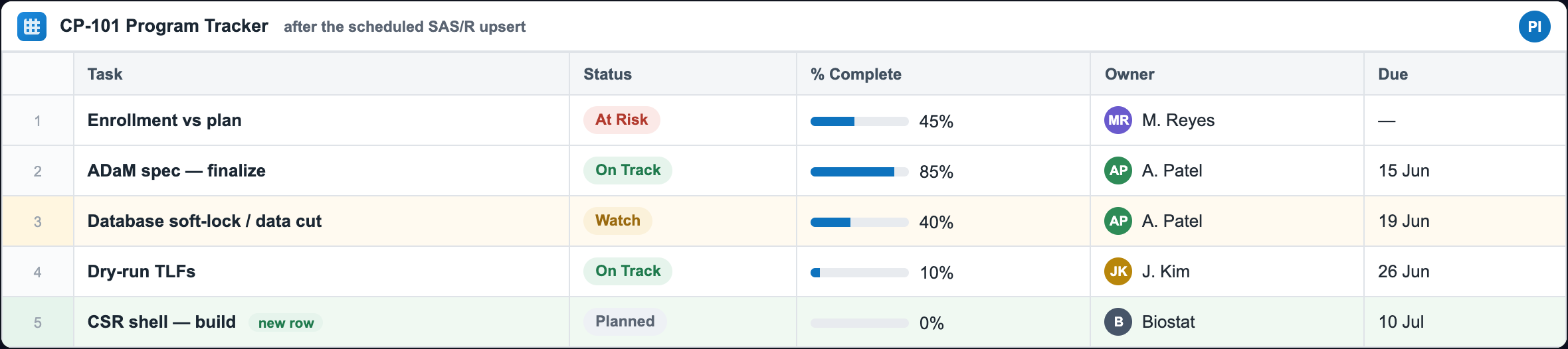
The tracker that updates itself — one nightly run on CP-101
The deterministic job doing its one job: reading the sheet, writing the truthful status by key, attaching the evidence, and letting Smartsheet send the alert — with zero AI and zero copy-paste.
What one scheduled run prints to the log
There is nothing to watch in a UI. The point is that every read and write is an auditable line in the job log, straight from the shipped code. Here is a representative run for the night the database cut slipped (the SAS log shown; the R companion prints the row-level equivalent underneath). Read it top to bottom.
# tracker_update.sas, fired by cron / Task Scheduler after the validated nightly extract refreshed
NOTE: [SHEETLINK] init - token loaded (length hidden); allowlist=TASK ID|STATUS|% DONE|OWNER|DUE|TASK
NOTE: [SHEETLINK] column map for sheet 1234567890123456 rebuilt (7 columns)
NOTE: [SHEETLINK] upsert sheet 1234567890123456 done - updated=8 cells / added=5 cells (idempotent by Task ID)
NOTE: [SHEETLINK] attached CP101_status.pdf to row 9876543210
NOTE: [SHEETLINK] tracker_update complete, status=OK

# the R companion (ss_companion.R) prints the row-level equivalent:
[SHEETLINK] upsert sheet 1234567890123456: 4 updated, 1 added (idempotent by TaskID)

# Smartsheet Automation, configured once in the UI:  Status -> At Risk  =>  email to the PM
The run is idempotent. Re-run it ten times tonight and the log converges to updated=0 cells / added=0 cells; a re-run cannot duplicate a row. Silence is never assumed either: a failed run mails the fail-loud address instead of finishing quietly.
The run, beat by beat
Read first, key by Task ID. The job pulls a fresh column map (columnIds are the only stable address, titles and order drift) and reads the existing rows keyed on the Task code you own, so it knows which rows to update in place and which to append. It never blind-appends, which is why a re-run cannot duplicate a row.
Write the truthful status by key. From the validated derived data: enrollment drops to At Risk, the database cut moves to Watch with its date slipping (17 → 19 Jun), the spec ticks to 85%, and one genuinely new CSR row is appended. All of it goes in a single idempotent upsert (existing keys are a PUT, new keys a POST), so re-running converges to the same sheet.
Cascade dependent dates deterministically. When the cut date moves, the dependent milestones (soft-lock, dry-run TLFs) are recomputed in SAS/R and pushed in the same call, so the timeline stays internally consistent without anyone re-typing a date.
Attach the evidence, then stop. The job attaches the one-page ops-only status PDF to the summary row, then stops. It sends no email of its own, and only aggregate operational status ever left the environment (the allowlist guard blocks anything else, in code).
Smartsheet sends the alert, a human decides. The instant Status became At Risk, the Automation a PM set up once fired the notification on whatever channel they chose. The code wrote the fact, Smartsheet chose who to tell, and the medical monitor or PM owns what it means.
The helper library — %ss_* macros & R functions
A small, deterministic library so “keep the tracker current” is a few lines you schedule. It guarantees five things: idempotent (never duplicates), ops-only (coded allowlist), token never logged, rate-limit aware, and fails loud. It also ships a dry run (preview an upsert before you schedule it — dryrun=Y / dryrun=TRUE / -DryRun), a read-back (%ss_get / ss_get()), and a runnable demo (_demo/) that exercises the real library against a representative Smartsheet API with no account needed.
These are the actual, complete library files, shown in full below and available as downloads above. The SAS macro library and the R companion are behaviour-matched; the PowerShell script is a laptop-only path with the same guarantees. Read the SAS library first, the R and PowerShell mirror it.
The complete SAS library: ss_macros.sas
SAS · 263 lines · the real shipped file, in full — nothing elided.
ss_macros.sas is the complete SHEETLINK helper library: every %ss_* macro that lets a scheduled, no-AI SAS job drive a Smartsheet tracker over its REST API using only PROC HTTP and the JSON LIBNAME engine on Base SAS 9.4M5+. It runs unattended (typically from a scheduler) to push OPS-ONLY data to the sheet: milestone dates, deliverable and QC status, % complete, aggregate enrollment counts, and ownership. It never carries PHI, participant-level, unblinded, or reported clinical numbers; reported numbers come from validated tools, never from this sheet. You %include this file once to define the macros, call %ss_init to load credentials and the allowlist, then call %ss_upsert (and friends) from your driver program. The file opens by declaring the shared global macro variables SS_BASE SS_TOKEN SS_RC SS_STATUS SS_BACKUP SS_ALLOW that the macros read and write across calls.
/*====================================================================================
  ss_macros.sas  -  SHEETLINK: a deterministic SAS macro library for driving Smartsheet
                    from scheduled SAS (no AI). PROC HTTP + the JSON LIBNAME engine.
  ------------------------------------------------------------------------------------
  Pattern : scheduled SAS writes ops-only data to Smartsheet by a stable key (idempotent
            upsert); Smartsheet's own configured workflows send the rich notifications.
  Prefix  : every macro is %ss_<name>.  Base SAS 9.4M5+ (PROC HTTP + JSON libname).
  GOVERNANCE (load-bearing): Smartsheet is a CLOUD SaaS -> only NON-SENSITIVE OPERATIONAL
            data may leave the tenant (milestone dates, deliverable/QC status, % complete,
            aggregate enrollment counts, ownership). NEVER PHI, participant-level, unblinded,
            or reported clinical numbers. %ss_guard enforces a column ALLOWLIST in code.
  SECURITY: the Bearer token is read from an env var / permissioned file at runtime, never
            hard-coded, never written to the log (OPTIONS NOSOURCE around the read).
  Idempotency: upsert by a STABLE EXTERNAL KEY (a Deliverable/Milestone code you control),
            never blind-append -> re-runs converge, never duplicate.
  Reliability: 300 req/min/token -> %ss_http retries 429/5xx with backoff and FAILS LOUD.
====================================================================================*/

%global SS_BASE SS_TOKEN SS_RC SS_STATUS SS_BACKUP SS_ALLOW;

/*==== %ss_init : base URL, token (from env/file, never logged), fail-loud target =====*/
%macro ss_init(tokenenv=SMARTSHEET_TOKEN, tokenfile=, backup=, allow=);
  %let SS_BASE = https://api.smartsheet.com/2.0;   /* pin /2.0 explicitly */
  %let SS_RC = 0; %let SS_STATUS = OK; %let SS_BACKUP = &backup;
  %let SS_ALLOW = %upcase(&allow);                 /* the ops-only column allowlist */
  options noquotelenmax;
  %local _had; %let _had = %sysfunc(getoption(source));
  options nosource nonotes;                        /* keep the token out of the log */
  %if %length(&tokenfile) %then %do;
    data _null_; infile "&tokenfile" length=l; input; call symputx('SS_TOKEN', strip(_infile_)); run;
  %end;
  %else %let SS_TOKEN = %sysget(&tokenenv);
  options &_had notes;
  %ss_assert(cond=%length(&SS_TOKEN)>0, msg=Smartsheet token not found (env &tokenenv / file &tokenfile), abort=Y);
  %put NOTE: [SHEETLINK] init - token loaded (length hidden); allowlist=&SS_ALLOW;
%mend ss_init;

/*==== %ss_assert : FAIL LOUD. A scheduled job must never fail silently. ===============*/
%macro ss_assert(cond=, msg=, abort=N);
  %if not (&cond) %then %do;
    %let SS_RC = 1; %let SS_STATUS = FAILED;
    %put ERROR: [SHEETLINK] ASSERT FAILED: &msg;
    %if %length(&SS_BACKUP) %then %do;
      filename _ssm email to=("&SS_BACKUP") subject="SHEETLINK FAILURE - &msg" importance="High";
      data _null_; file _ssm; put "SHEETLINK Smartsheet job FAILED: &msg"; put "The tracker may be stale - do not assume it is current."; run;
      filename _ssm clear;
    %end;
    %if &abort=Y %then %abort cancel;
  %end;
%mend ss_assert;

/*==== %ss_http : the core call. Bearer auth, JSON, 429/5xx retry+backoff, fail-loud.
       method=GET/POST/PUT/DELETE ; path appended to &SS_BASE ; in= request-body fileref ;
       out= response fileref. Returns the HTTP status in &ss_code.                       */
%macro ss_http(method=GET, path=, in=, out=_ssresp, ctype=application/json, retries=4);
  %global ss_code;
  filename &out temp; filename _sshdr temp;
  %local try wait; %let try=0; %let wait=2;
  %do %until(&try > &retries);
    proc http url="&SS_BASE/&path" method="&method"
        %if %length(&in) %then in=&in ct="&ctype"; out=&out headerout=_sshdr;
      headers "Authorization"="Bearer &SS_TOKEN" "Accept"="application/json";
    run;
    %let ss_code = &SYS_PROCHTTP_STATUS_CODE;
    %if &ss_code = 429 or (&ss_code >= 500 and &ss_code <= 599) %then %do;   /* throttled / transient */
      %put WARNING: [SHEETLINK] HTTP &ss_code on &method &path - backoff &wait.s (try &try);
      data _null_; rc=sleep(&wait,1); run;  %let wait=%eval(&wait*2); %let try=%eval(&try+1);
    %end;
    %else %let try=%eval(&retries+1);   /* done: success or a non-retryable error */
  %end;
  %ss_assert(cond=(&ss_code >= 200 and &ss_code < 300), msg=&method &path returned HTTP &ss_code);
  filename _sshdr clear;
%mend ss_http;

/*==== %ss_colmap : GET the sheet, build a fresh column NAME -> columnId map (&out).
       Rebuilt EVERY run - columnIds are the only stable cell address; names/order drift.*/
%macro ss_colmap(sheet=, out=ss_cols);
  %ss_http(method=GET, path=sheets/&sheet, out=_sssheet);
  libname _ssj JSON fileref=_sssheet;
  /* the JSON engine exposes a COLUMNS table with id + title (verify names vs your response) */
  data &out; set _ssj.columns(keep=id title type); name=upcase(title); run;
  libname _ssj clear;
  %put NOTE: [SHEETLINK] column map for sheet &sheet rebuilt (%obs(&out) columns);
%mend ss_colmap;

/*==== %ss_get_rows : GET the sheet rows + cells -> a long dataset (&out) of
       rowId * columnId * value, plus the key->rowId map keyed on &keycol's column.       */
%macro ss_get_rows(sheet=, out=ss_rows);
  %ss_http(method=GET, path=sheets/&sheet?includeAll=true, out=_sssheet);
  libname _ssj JSON fileref=_sssheet;
  /* ROWS has id; the cells live in a child table keyed by an ordinal back to ROWS.
     Join cells->rows to get rowId, and cells->columns(name) via columnId.                */
  proc sql;
    create table &out as
      select r.id as rowId, c.columnId, c.value
      from _ssj.rows r join _ssj.rows_cells c on r.ordinal_rows = c.ordinal_rows;
  quit;
  libname _ssj clear;
%mend ss_get_rows;

/*==== %ss_get : read ONE cell value back by its key (verification / read-after-write).
       Result is returned in the macro var named by mvar (default ss_value).               */
%macro ss_get(sheet=, key=, keycolname=, col=, mvar=ss_value);
  %global &mvar; %let &mvar=;
  %ss_colmap(sheet=&sheet, out=_ssgc); %ss_get_rows(sheet=&sheet, out=_ssgr);
  %local kid cid;
  proc sql noprint;
    select id into :kid trimmed from _ssgc where name=%upcase("&keycolname");
    select id into :cid trimmed from _ssgc where name=%upcase("&col");
    select cats(value) into :&mvar trimmed from _ssgr
      where columnId=&cid and rowId=(select rowId from _ssgr where columnId=&kid and upcase(cats(value))=%qupcase("&key"));
  quit;
  %put NOTE: [SHEETLINK] ss_get &col for &key = %superq(&mvar);
%mend ss_get;

/*==== %ss_guard : enforce the OPS-ONLY column allowlist in code. The column TITLES a job
       is about to write MUST all be in &SS_ALLOW - else FAIL LOUD (no PHI to the cloud).
       cols and SS_ALLOW are PIPE-delimited (Smartsheet titles contain spaces).           */
%macro ss_guard(cols=);
  %local i v bad n; %let bad=; %let n=%sysfunc(countw(%superq(cols),|));
  %do i=1 %to &n; %let v=%qupcase(%qscan(%superq(cols),&i,|));
    %if %length(&v) and not %sysfunc(indexw(%superq(SS_ALLOW),&v,|)) %then %let bad=&bad.[&v];
  %end;
  %ss_assert(cond=(%length(&bad)=0), msg=BLOCKED non-allowlisted column(s) for Smartsheet: &bad - possible PHI/sensitive leak, abort=Y);
%mend ss_guard;

/*==== %ss_emit : write a Smartsheet rows-array JSON body from a long cells dataset
       (keyval rowId columnId valstr isnum), grouped one object per keyval.
       mode=UPDATE -> {"id":rowId,...} ; mode=ADD -> {"toBottom":true,...}.               */
%macro ss_emit(cells=, body=, mode=UPDATE);
  filename &body temp;
  proc sort data=&cells; by keyval; run;
  data _null_; file &body lrecl=20000; set &cells end=last; by keyval;
    retain rowsep cellsep; length line $9000 esc $8600;     /* wide: a quote-heavy value ~doubles when escaped */
    if _n_=1 then put '[';
    if first.keyval then do;
      if rowsep then put ',';
      %if %upcase(&mode)=UPDATE %then %do; line = cats('{"id":', rowId, ',"cells":['); %end;
      %else %do;                          line = '{"toBottom":true,"cells":[';        %end;
      l = length(line); put line $varying9000. l;           /* exact width - no padding  */
      rowsep = 1; cellsep = 0;
    end;
    esc = tranwrd(strip(valstr),'\','\\'); esc = tranwrd(esc,'"','\"');   /* JSON-escape */
    if isnum then line = cats('{"columnId":', columnId, ',"value":',  strip(valstr), '}');
    else          line = cats('{"columnId":', columnId, ',"value":"', strip(esc),    '"}');
    if cellsep then line = cats(',', line);
    l = length(line); put line $varying9000. l;
    cellsep = 1;
    if last.keyval then put ']}';
    if last then put ']';
  run;
%mend ss_emit;

/*==== %ss_upsert : the flagship. Idempotent update-by-key, add-if-new. NEVER duplicates.
       data : one row per record; a key variable (&keycol) plus value variables, each
              value variable LABELED with its exact Smartsheet column TITLE.
              e.g.  label Status="Status" PctDone="% Done" DueDate="Due";
       Existing keys -> PUT (update in place); new keys -> POST (append). Re-runs converge. */
%macro ss_upsert(sheet=, keycol=, keycolname=, data=, dryrun=N);
  %ss_colmap(sheet=&sheet, out=_ssc);                          /* name(upcase title)->id   */
  %ss_get_rows(sheet=&sheet, out=_ssr);

  /* the key column's id + the current key-value -> rowId map */
  %local keyid; proc sql noprint; select id into :keyid trimmed from _ssc where name=%upcase("&keycolname"); quit;
  proc sql; create table _sskey as select rowId, value as keyval from _ssr where columnId=&keyid; quit;

  /* attach the existing rowId (if the key already lives on the sheet).
     The key should be a TEXT column on the sheet; cats() compares text-exactly and converts
     a numeric key without leading blanks (a zero-padded code must be stored as text both sides). */
  proc sql; create table _ssjob as
    select d.*, k.rowId from &data d left join _sskey k on cats(d.&keycol)=cats(k.keyval); quit;

  /* enumerate the value variables by type (exclude the key + the joined rowId) */
  %local cv nv nvv nlbl lbls;
  proc contents data=_ssjob(drop=rowId) out=_ct(keep=name type label) noprint; run;
  proc sql noprint;
    select name into :cv separated by ' ' from _ct where upcase(name) ne %upcase("&keycol") and type=2;
    select name into :nv separated by ' ' from _ct where upcase(name) ne %upcase("&keycol") and type=1;
    select count(*) into :nvv  trimmed from _ct where upcase(name) ne %upcase("&keycol");
    select count(*) into :nlbl trimmed from _ct where upcase(name) ne %upcase("&keycol") and label ne '';
    select distinct upcase(label) into :lbls separated by '|' from _ct
      where label ne '' and upcase(name) ne %upcase("&keycol");
  quit;

  /* every value variable MUST be labeled with its title (else it would be silently dropped) */
  %ss_assert(cond=(&nvv=&nlbl), msg=Every value variable must be LABELED with its Smartsheet column title, abort=Y);
  /* GUARD: every value-variable label (its Smartsheet title) must be on the ops-only allowlist */
  %ss_guard(cols=&lbls|%upcase(&keycolname));

  /* transpose value vars to long; PROC TRANSPOSE writes each var's label into _LABEL_.
     No empty stubs (a stub's short key length would truncate the real key on SET).         */
  %if %length(&cv) %then %do; proc transpose data=_ssjob out=_lc(rename=(col1=_v));  by &keycol rowId notsorted; var &cv; run; %end;
  %if %length(&nv) %then %do; proc transpose data=_ssjob out=_ln(rename=(col1=_nv)); by &keycol rowId notsorted; var &nv; run; %end;

  data _cells;
    set %if %length(&cv) %then _lc(in=inc); %if %length(&nv) %then _ln(in=inn); ;
    length title $200 valstr $4300;
    %if %length(&cv) and %length(&nv) %then %do; isnum=inn; if inc then valstr=strip(_v); else valstr=strip(put(_nv,best32.)); %end;
    %else %if %length(&cv) %then %do; isnum=0; valstr=strip(_v); %end;
    %else %do; isnum=1; valstr=strip(put(_nv,best32.)); %end;
    title = upcase(_label_);
    if missing(valstr) or valstr='.' then delete;   /* don't push empty cells */
  run;
  /* always (re)assert the key cell, and resolve every title -> columnId */
  data _keycell; set _ssjob; length title $200 valstr $4300; title=%upcase("&keycolname");
    valstr=cats(&keycol); isnum=0; keep &keycol rowId title valstr isnum; run;
  data _allcells; set _cells _keycell; run;
  proc sql; create table _cells2 as
    select c.&keycol as keyval length=200, c.rowId, m.id as columnId, c.valstr, c.isnum
    from _allcells c join _ssc m on c.title=m.name; quit;

  /* split existing (PUT) from new (POST) and send each only if non-empty */
  data _cupd _cnew; set _cells2; if rowId>. then output _cupd; else output _cnew; run;
  %if %upcase(&dryrun)=Y %then %do;   /* preview only: validate a job before you schedule it */
    %put NOTE: [SHEETLINK] DRY RUN sheet &sheet - would update=%obs(_cupd) cells / add=%obs(_cnew) cells (idempotent by &keycolname) - nothing sent;
    %return;
  %end;
  %if %obs(_cupd) %then %do; %ss_emit(cells=_cupd, body=_bupd, mode=UPDATE);
    %ss_http(method=PUT,  path=sheets/&sheet/rows, in=_bupd, out=_rupd); filename _bupd clear; %end;
  %if %obs(_cnew) %then %do; %ss_emit(cells=_cnew, body=_bnew, mode=ADD);
    %ss_http(method=POST, path=sheets/&sheet/rows, in=_bnew, out=_rnew); filename _bnew clear; %end;
  %put NOTE: [SHEETLINK] upsert sheet &sheet done - updated=%obs(_cupd) cells / added=%obs(_cnew) cells (idempotent by &keycolname);
%mend ss_upsert;

/*==== %ss_attach : attach an operational artifact (status PDF/QC summary) to a row.
       Rate-intensive (~10x): use sparingly. Ops-only files only.                         */
%macro ss_attach(sheet=, row=, file=, name=);
  %local fn; %let fn=%sysfunc(coalescec(&name,%scan(&file,-1,/)));
  filename _ssf "&file" recfm=n;
  proc http url="&SS_BASE/sheets/&sheet/rows/&row/attachments" method="POST" in=_ssf out=_ssatt headerout=_ssh
       ct="application/pdf";
    headers "Authorization"="Bearer &SS_TOKEN" "Content-Disposition"="attachment; filename=""&fn""";
  run;
  filename _ssf clear;
  %ss_assert(cond=(&SYS_PROCHTTP_STATUS_CODE >= 200 and &SYS_PROCHTTP_STATUS_CODE < 300), msg=attach &fn returned &SYS_PROCHTTP_STATUS_CODE);
  %put NOTE: [SHEETLINK] attached &fn to row &row;
%mend ss_attach;

/*==== %ss_update_request : the supported human-in-the-loop notification. Emails the
       recipients a link to update the given rows/columns. Ops-only message text.
       sendto = SPACE-separated emails ; rowids / colids = COMMA-separated bare ids.        */
%macro ss_update_request(sheet=, rowids=, colids=, sendto=, subject=, message=);
  filename _ssur temp;
  data _null_; file _ssur lrecl=8000;
    length line $4000 tok $200 subj $600 msg $2000; i=1;
    subj = tranwrd(tranwrd("&subject",'\','\\'),'"','\"');   /* JSON-escape the free text */
    msg  = tranwrd(tranwrd("&message",'\','\\'),'"','\"');
    line='{"sendTo":[';
    do while(scan("&sendto",i,' ') ne '');     /* recipients as {"email":"..."} */
      tok=scan("&sendto",i,' ');
      line=cats(line, ifc(i>1,',',''), '{"email":"', strip(tok), '"}'); i+1;
    end;
    line=cats(line, '],"rowIds":[', "&rowids", '],"columnIds":[', "&colids", '],',
              '"subject":"', strip(subj), '","message":"', strip(msg), '","includeAttachments":false}');
    l=length(line); put line $varying4000. l;
  run;
  %ss_http(method=POST, path=sheets/&sheet/updaterequests, in=_ssur, out=_ssurr);
  filename _ssur clear;
  %put NOTE: [SHEETLINK] update request sent to &sendto;
%mend ss_update_request;

%macro obs(ds); %sysfunc(attrn(%sysfunc(open(&ds)),nlobs)) %mend;
/*==== End ss_macros.sas. See ss_config.sas, tracker_update.sas, ss_companion.R, README. */
Walkthrough, part by part
ss_init: base URL, token loading, and the allowlist. %ss_init is the setup call you run once before anything else. It pins SS_BASE to https://api.smartsheet.com/2.0, resets the run-status globals (SS_RC=0, SS_STATUS=OK), records the backup email for failure alerts, and stores the ops-only column allowlist uppercased in SS_ALLOW. The Bearer token is read at runtime either from a permissioned file (tokenfile=, via an infile read into SS_TOKEN) or from an environment variable (tokenenv=, default SMARTSHEET_TOKEN, via %sysget), and the read is wrapped in options nosource nonotes so the secret never lands in the log. It finishes by asserting the token is non-empty with abort=Y, so a missing credential stops the job immediately rather than running blind.
ss_assert: fail loud, never fail silently. %ss_assert is the error spine of the whole library: a scheduled job that fails silently is worse than one that stops, because a stale tracker looks current. When its cond is false it sets SS_RC=1 and SS_STATUS=FAILED, writes an ERROR: line to the log, and, if a SS_BACKUP address was configured, sends a high-importance email whose body warns that the tracker may be stale and should not be assumed current. When called with abort=Y it issues %abort cancel to halt the job outright. Every other macro routes its failures through this one, which is why the allowlist guard and the token check can actually stop a run.
ss_http: the core API call with retry and backoff. %ss_http is the single choke point every request passes through: it calls PROC HTTP against &SS_BASE/&path with the chosen method, attaches Authorization: Bearer &SS_TOKEN and Accept: application/json, sends a request-body fileref (with ct=&ctype) when in= is given, and captures the response in the out= fileref (default _ssresp). Because Smartsheet throttles at 300 requests/min/token, it inspects SYS_PROCHTTP_STATUS_CODE (exposed as &ss_code) and retries on 429 or any 5xx with exponential backoff (the wait starts at 2 seconds and doubles), controlled by retries=4 so the loop makes up to 5 HTTP attempts. After the loop it asserts the final status is 2xx, so a genuine failure fails loud rather than leaving the sheet half-written.
ss_colmap: rebuild the column name-to-id map every run. %ss_colmap GETs the sheet metadata and builds a fresh lookup dataset (default ss_cols) mapping the uppercased column title (in the name variable) to its column id (kept in the id variable). It points the JSON LIBNAME engine at the response and keeps id title type from the columns table, setting name=upcase(title) for case-insensitive matching. This is rebuilt on every run on purpose: the column id values are the only stable cell address, while column names and order can drift as people edit the sheet, so caching them would silently corrupt writes.
ss_get_rows: pull rows and cells into a long dataset. %ss_get_rows GETs the full sheet with ?includeAll=true and reshapes it into a long dataset (default ss_rows) of rowId * columnId * value, one observation per cell the API returns for a row. Under the JSON engine the cells live in a child table, so it joins rows to rows_cells on the engine's ordinal_rows link to recover each cell's owning rowId. This long shape is what lets the upsert compare the current sheet state against your incoming data by key, which is the mechanism that makes re-runs converge instead of duplicating.
ss_get: read one cell back by its key. %ss_get is the read-after-write verification helper: given a key value, the key column's title (keycolname), and a target column (col), it returns that one cell's value in the macro variable named by mvar (default ss_value). It refreshes both the column map and the row data, resolves the key column's and target column's ids, then finds the rowId whose key cell matches (compared as uppercased text via cats) and pulls the requested cell from that row. Use it to confirm a scheduled write actually landed; it moves only operational values, never anything sensitive.
ss_guard: the in-code PHI boundary. %ss_guard is the load-bearing governance control: it takes the pipe-delimited list of column titles a job is about to write and verifies every one is present in the SS_ALLOW allowlist (both are pipe-delimited because Smartsheet titles contain spaces). It uppercases and scans each title with indexw against the allowlist, accumulating any non-member into bad, then asserts bad is empty with abort=Y. Any column not explicitly approved as operational stops the job cold, which is exactly how the code prevents PHI, participant-level, unblinded, or reported clinical numbers from ever reaching the cloud SaaS. This allowlist is the enforced boundary, so keeping it tight is the whole safety story.
ss_emit: build the Smartsheet rows-array JSON body. %ss_emit turns a long cells dataset (keyval rowId columnId valstr isnum) into the JSON array Smartsheet's rows endpoints expect, sorting by keyval and emitting one object per key. In mode=UPDATE each object carries an update object keyed on the rowId for an in-place update; in mode=ADD it emits an append object marked "toBottom":true to append. It hand-writes the JSON with $varying puts sized to each line and JSON-escapes backslashes and quotes in text values via tranwrd, while numeric cells (isnum) are written unquoted so Smartsheet stores them as numbers. You do not normally call this directly: %ss_upsert calls it for you.
ss_upsert: the idempotent flagship. %ss_upsert is the macro you actually schedule: it does an update-by-key, add-if-new so re-runs converge and never duplicate. You pass one row per record in data, a keycol holding a stable external code (a Deliverable or Milestone code you control), and value variables each labeled with its exact Smartsheet column title; it rebuilds the column map and rows, left-joins your data to the existing rowId by comparing keys as text with cats, and splits matched keys to a PUT (update) and new keys to a POST (append). Before sending anything it asserts every value variable is labeled and then calls %ss_guard on those labels plus the key column, so an unapproved column aborts the run before a single write. It supports dryrun=Y to report the would-update and would-add cell counts and send nothing, which lets you validate a job before scheduling it. The key column stores a text key on both sides so a zero-padded code is compared exactly and does not collapse to a number.
ss_attach: attach an operational artifact to a row. %ss_attach uploads a file (a status PDF or QC summary) to a specific row via a POST to that row's attachments endpoint, deriving the display name from the argument or the file's last path segment. It calls PROC HTTP directly (not through %ss_http), reads the file raw (recfm=n), sets Content-Disposition with the filename, and asserts a 2xx status via %ss_assert so a failed upload fails loud. It is rate-intensive (roughly 10x a normal request), so the header comment says to use it sparingly, and it too is for ops-only files, never participant-level or clinical content.
ss_update_request: the human-in-the-loop notification. %ss_update_request is the supported way to ask people to fill in cells: it POSTs to the sheet's updaterequests endpoint, emailing each recipient a link to update the named rows and columns. It hand-builds the JSON body: sendto is space-separated emails expanded into individual email objects entries under sendTo, rowids and colids are comma-separated bare ids dropped straight into rowIds and columnIds, and the free-text subject and message are JSON-escaped before insertion. It sets includeAttachments:false and routes the send through %ss_http, and its message text is operational only.
obs: the row-count helper. %obs is a one-line utility that returns a dataset's logical observation count by opening it with open and reading the nlobs attribute via attrn. The other macros use it inline for their log messages and control flow: for example %ss_upsert reports updated=%obs(_cupd) and added=%obs(_cnew), and guards each API send with %if %obs(dataset) so an empty update or add batch is skipped entirely. Small as it is, it is what lets the library only make calls it actually needs to.
The same library in R: ss_companion.R
R (httr2 + jsonlite) · 114 lines · the real shipped file, in full — nothing elided.
ss_companion.R is the R twin of the SHEETLINK SAS library (ss_macros.sas): an httr2-based toolkit (the header names httr2 + jsonlite) that lets scheduled R jobs push operational tracker data into Smartsheet with no AI in the loop. It runs unattended, typically nightly under cronR or taskscheduleR, refreshing status, dates, percent-complete, ownership, and aggregate counts on a shared sheet. The governance model is identical to the SAS version: an ops-only column allowlist enforced in code, the bearer token read from an environment variable rather than hard-coded, idempotent upsert-by-key so re-runs never duplicate rows, retry on 429/5xx, and fail-loud assertions. Reported clinical numbers never travel through this file: those come only from validated tools, and the allowlist is the in-code PHI boundary that keeps participant-level or unblinded data off the cloud SaaS.
# =====================================================================================
# ss_companion.R  -  SHEETLINK R companion: drive Smartsheet from scheduled R (no AI).
# httr2 + jsonlite. Same governance as ss_macros.sas: ops-only column allowlist, token
# from an env var (never hard-coded), idempotent upsert-by-key, 429/5xx retry, fail-loud.
# Schedule with cronR / taskscheduleR; pin packages with renv.
# =====================================================================================
suppressPackageStartupMessages({ library(httr2); library(dplyr); library(purrr); library(tibble) })

SS_BASE <- "https://api.smartsheet.com/2.0"

# ---- a request pre-loaded with auth, JSON, and 429/5xx retry with backoff -------------
ss_req <- function(...) {
  token <- Sys.getenv("SMARTSHEET_TOKEN")
  if (!nzchar(token)) stop("[SHEETLINK] SMARTSHEET_TOKEN not set", call. = FALSE)
  request(SS_BASE) |>
    req_url_path_append(...) |>
    req_auth_bearer_token(token) |>
    req_headers(Accept = "application/json") |>
    req_retry(max_tries = 5, is_transient = \(resp) resp_status(resp) %in% c(429, 500, 502, 503, 504),
              backoff = \(i) 2^i)
}

# ---- FAIL LOUD --------------------------------------------------------------------------
ss_assert <- function(cond, msg) if (!isTRUE(cond)) stop("[SHEETLINK] ", msg, call. = FALSE)

# ---- enforce the ops-only column ALLOWLIST in code (no PHI to the cloud) ---------------
ss_guard <- function(cols, allow) {
  bad <- setdiff(toupper(cols), toupper(allow))
  ss_assert(length(bad) == 0, paste("BLOCKED non-allowlisted column(s):", paste(bad, collapse = ", "),
                                     "- possible PHI/sensitive leak"))
}

# ---- GET the sheet -> fresh column NAME -> columnId map (rebuilt every run) ------------
ss_colmap <- function(sheet) {
  body <- ss_req("sheets", sheet) |> req_perform() |> resp_body_json()
  setNames(map_dbl(body$columns, "id"), toupper(map_chr(body$columns, "title")))
}

# ---- GET the sheet rows -> tibble(rowId, <Col Title> = value), keyed for upsert --------
ss_get_rows <- function(sheet, colmap) {
  body <- ss_req("sheets", sheet) |> req_url_query(includeAll = "true") |> req_perform() |> resp_body_json()
  id2name <- setNames(names(colmap), as.character(colmap))
  map_dfr(body$rows, function(r) {
    vals <- map(r$cells, function(c) c$value %||% NA); names(vals) <- id2name[as.character(map_dbl(r$cells, "columnId"))]
    tibble(rowId = r$id, !!!vals)
  })
}

# ---- the flagship: IDEMPOTENT upsert by a stable external key (never duplicates) -------
# df: a data.frame with the key column + one column per Smartsheet column title to write.
ss_upsert <- function(sheet, key, df, allow, dryrun = FALSE) {
  ss_guard(c(names(df)), allow)
  colmap  <- ss_colmap(sheet)
  current <- tryCatch(ss_get_rows(sheet, colmap), error = function(e) tibble(rowId = numeric()))
  keyname <- toupper(key)
  existing <- if (nrow(current) && keyname %in% toupper(names(current)))
                setNames(current$rowId, current[[which(toupper(names(current)) == keyname)]]) else numeric()
  rows <- pmap(df, function(...) {
    r <- list(...); kv <- as.character(r[[key]]); rid <- existing[kv]
    cells <- imap(r, function(v, nm) list(columnId = unname(colmap[toupper(nm)]), value = v))
    # drop cells with no mapped column, AND cells whose value is NA: an NA means "leave this
    # cell untouched" — never write a blank/NA, which would otherwise land in the sheet as the
    # literal text "NA" (and clobber a real value).
    cells <- Filter(function(c) !is.na(c$columnId) &&
                    !(length(c$value) == 1 && (is.na(c$value) || (is.character(c$value) && c$value == ""))), cells)
    if (!is.na(rid)) list(id = unname(rid), cells = unname(cells))
    else             list(toBottom = TRUE,  cells = unname(cells))
  })
  upd <- Filter(function(x) !is.null(x$id), rows); new <- Filter(function(x) is.null(x$id), rows)
  if (isTRUE(dryrun)) {   # preview what WOULD be sent (validate a job before you schedule it)
    message(sprintf("[SHEETLINK] DRY RUN sheet %s: would update %d, add %d (idempotent by %s) - nothing sent",
                    sheet, length(upd), length(new), key))
    return(invisible(list(update = upd, add = new)))
  }
  if (length(upd)) ss_req("sheets", sheet, "rows") |> req_method("PUT")  |> req_body_json(upd) |> req_perform()
  if (length(new)) ss_req("sheets", sheet, "rows") |> req_method("POST") |> req_body_json(new) |> req_perform()
  message(sprintf("[SHEETLINK] upsert sheet %s: %d updated, %d added (idempotent by %s)", sheet, length(upd), length(new), key))
}

# ---- attach an operational artifact to a row (rate-intensive; ops-only files) ---------
ss_attach <- function(sheet, row, file) {
  ss_req("sheets", sheet, "rows", row, "attachments") |>
    req_body_file(file, type = "application/pdf") |>
    req_headers(`Content-Disposition` = sprintf('attachment; filename="%s"', basename(file))) |>
    req_perform()
  message("[SHEETLINK] attached ", basename(file), " to row ", row)
}

# ---- supported human-in-the-loop notification: an update request (ops-only text) ------
ss_update_request <- function(sheet, rowIds, columnIds, sendTo, subject, message) {
  body <- list(sendTo = map(sendTo, ~list(email = .x)), rowIds = rowIds, columnIds = columnIds,
               subject = subject, message = message, includeAttachments = FALSE)
  ss_req("sheets", sheet, "updaterequests") |> req_method("POST") |> req_body_json(body) |> req_perform()
  message("[SHEETLINK] update request sent")
}

# ---- read ONE cell value back by its key (verification / read-after-write) -------------
ss_get <- function(sheet, key, keycol, col) {
  cm <- ss_colmap(sheet); rows <- ss_get_rows(sheet, cm)
  kc <- which(toupper(names(rows)) == toupper(keycol)); cc <- which(toupper(names(rows)) == toupper(col))
  if (!length(kc) || !length(cc)) return(NA)
  hit <- rows[!is.na(rows[[kc]]) & toupper(as.character(rows[[kc]])) == toupper(key), , drop = FALSE]
  if (!nrow(hit)) NA else hit[[cc]][1]
}

`%||%` <- function(a, b) if (is.null(a)) b else a

# ---- example nightly driver (schedule with cronR::cron_add / taskscheduleR) -----------
if (sys.nframe() == 0) {
  allow <- c("TaskID", "Status", "PctDone", "Owner", "Due")    # the ops-only allowlist
  df <- tibble(TaskID = c("CP101-ENR", "CP101-ADPC"),
               Status = c("At Risk", "On Track"), PctDone = c(NA, 0.85), Due = c("", "2026-06-15"))
  ss_upsert(sheet = Sys.getenv("CP101_TRACKER_ID"), key = "TaskID", df = df, allow = allow)
}
Walkthrough, part by part
Header, dependencies, and SS_BASE. The top comment block states the contract this library holds itself to: ops-only column allowlist, token from an env var, idempotent upsert-by-key, 429/5xx retry with backoff, and fail-loud behavior, matching ss_macros.sas. It loads httr2, dplyr, purrr, and tibble quietly, and pins SS_BASE to the Smartsheet API v2 root https://api.smartsheet.com/2.0 so every call builds off one base URL. The comment also names the operational expectations: schedule with cronR or taskscheduleR, and pin package versions with renv so a scheduled job is reproducible. Nothing here touches data; it just establishes the environment the rest of the functions assume.
ss_req: the authenticated, retrying request builder. ss_req reads SMARTSHEET_TOKEN from the environment and stops immediately if it is empty (via nzchar), so the token is never hard-coded into the script and a missing credential fails before any network call. It constructs an httr2 request against SS_BASE, appends whatever path segments you pass through req_url_path_append, attaches the bearer token, and sets the Accept: application/json header. It also installs req_retry with up to 5 tries, treating status 429, 500, 502, 503, and 504 as transient, with a 2^i backoff. Every other function routes through this one, so authentication and resilience are defined in exactly one place.
ss_assert: fail loud. ss_assert takes a condition and a message and stops with a [SHEETLINK]-prefixed error unless the condition is exactly TRUE (via isTRUE). This is the fail-loud primitive: a scheduled job that hits a broken precondition halts with a clear, greppable message rather than silently writing partial or wrong data. It matters most for the allowlist guard, where a false condition means a potential PHI leak and the run must not continue.
ss_guard: the in-code PHI boundary. ss_guard compares the columns you intend to write against the allowlist, case-insensitively via toupper, and computes the set difference with setdiff. If any column is not on the allowlist, it calls ss_assert with a message that names the blocked columns and warns of a possible PHI or sensitive leak, which halts the run. This is the load-bearing governance control: only ops-only fields (status, dates, percent-complete, ownership, aggregate counts) are permitted to reach the cloud SaaS, and anything participant-level, unblinded, or clinically reported is blocked at the source before a request is ever built. Reported numbers come from validated tools, never from this sheet, and this function is where that boundary is enforced in code.
ss_colmap: the fresh column-name to id map. ss_colmap GETs the sheet and builds a named vector mapping each uppercased column title to its numeric column id, using map_dbl(body$columns, "id") keyed by toupper of each column title. It is rebuilt on every run so the job always writes against the sheet's current structure rather than a cached, possibly stale, column layout. Smartsheet addresses cells by column id, not by title, so this map is the translation layer that lets the rest of the code work in human-readable column names.
ss_get_rows: the keyed snapshot of current rows. ss_get_rows GETs the sheet with includeAll=true to pull every row, then inverts the colmap into an id-to-name lookup so each cell can be relabeled by its column title. For each row it collects the cell values (defaulting a null value to NA through the %||% helper), names them by column title via the columnId of each cell, and emits a tibble with rowId plus one column per title via map_dfr. This snapshot is what makes upsert possible: it carries the existing rowId for every key already present in the sheet, so the writer can decide update versus add.
ss_upsert: the idempotent flagship. ss_upsert is the main entry point: it first calls ss_guard on the data frame's columns so a non-allowlisted field aborts the whole write, then rebuilds the colmap and reads current rows, tolerating a read failure by falling back to an empty tibble. It builds a key-to-rowId index from the existing rows, then for each input row constructs cells and filters them, dropping any cell with no mapped column and, critically, any cell whose value is NA or an empty string so an absent value means leave the cell untouched rather than writing the literal text "NA" and clobbering a real value. Rows whose key already exists become updates carrying that id; new keys become adds with toBottom = TRUE, which is what guarantees a re-run never duplicates a row (idempotent by the stable external key). When dryrun is TRUE it reports the counts it would update and add and sends nothing, letting you validate a job before scheduling it; otherwise it PUTs the updates and POSTs the adds and logs the result.
ss_attach: attach an operational artifact to a row. ss_attach POSTs a file to a specific row's attachments endpoint, sending it as application/pdf with a Content-Disposition header that preserves the file's base name (via basename). The comment flags it as rate-intensive, so it is meant for occasional operational artifacts rather than bulk use. Consistent with the governance model, this is for ops-only files (for example a status report or a schedule export), not participant-level or clinical outputs, and it logs the attachment on success.
ss_update_request: the human-in-the-loop notification. ss_update_request POSTs to the updaterequests endpoint to ask named people, given as email addresses, to review or fill in specific rows and columns, with a subject and message. It sets includeAttachments = FALSE so the request carries only the ops-only text and cell references, not files. This is the supported way to bring a person into the loop from an automated job, keeping decisions and edits with a human while the scheduled R job handles the mechanical pushes.
ss_get: read-after-write verification. ss_get reads a single cell value back by key: it fetches a fresh colmap and rows, locates the key column and the target column case-insensitively, and returns NA if either is absent. It then finds the row whose key column matches the requested key (case-insensitive, ignoring NA keys) and returns the first matching value in the target column, or NA if there is no hit. This supports verification and read-after-write checks, letting a job confirm that a value it pushed actually landed on the sheet.
The %||% null-coalescing helper. %||% is a small infix operator that returns its left side unless that side is NULL, in which case it returns the right side. ss_get_rows relies on it to turn a null cell value into NA so the resulting tibble has a clean, consistent shape. It is defined here as plain R, so the library does not depend on the same-named operator from another package being loaded.
The example nightly driver block. The trailing block runs only when the file is executed as a script rather than sourced, guarded by if (sys.nframe() == 0), so importing the functions does not trigger a live write. It defines an ops-only allowlist (TaskID, Status, PctDone, Owner, Due), builds a small demonstration tibble for a synthetic CP101 tracker, and includes deliberate blanks: PctDone = NA and Due = "" exercise the leave-untouched behavior so those cells are not overwritten. It then calls ss_upsert with the sheet id read from CP101_TRACKER_ID in the environment and TaskID as the key, showing the intended pattern: schedule this file with cronR::cron_add or taskscheduleR to refresh an ops tracker unattended.
Standalone on Windows, no SAS or R: Update-Smartsheet.ps1
PowerShell 5.1+ · 106 lines · the real shipped file, in full — nothing elided.
Update-Smartsheet.ps1 is a standalone Windows PowerShell 5.1+ script that pushes operational status from a CSV file into a Smartsheet tracker, idempotently, with no SAS or R in the loop and no clicking around the Smartsheet GUI. A biostatistician runs it from a laptop, typically after exporting a small status CSV, to keep a shared tracker current: sheet is found by name, columns are mapped by title, and rows are matched on a stable key so re-runs never duplicate. It is the Windows companion to the SHEETLINK %ss_* SAS and ss_companion.R helpers (use those inside pipelines, this one standalone). Governance is built in: an allowlist guard is the in-code PHI boundary, so only non-sensitive operational fields (status, dates, % complete, counts, ownership) ever leave the machine, never PHI, participant-level, unblinded, or reported clinical numbers, which come only from validated tools.
<#  Update-Smartsheet.ps1  ----------------------------------------------------
  Push operational status from a CSV into a Smartsheet tracker, IDEMPOTENTLY,
  with NO Smartsheet GUI hunting. The ONLY Smartsheet UI step is generating the
  API token once (Account > Apps & Integrations > API Access > Generate). After
  that everything is the API:
     * find the sheet BY NAME            (no copying IDs from the URL)
     * map columns BY TITLE              (no copying column IDs)
     * upsert rows by a stable key       (re-run-safe, never duplicates)
     * ops-only allowlist guard          (the in-code PHI boundary)

  The Windows companion to the SHEETLINK %ss_* SAS / ss_companion.R helpers (use
  those inside EG / R pipelines; use this standalone on the laptop). Token comes
  from $env:SMARTSHEET_TOKEN and is NEVER logged. Windows PowerShell 5.1+.

  Example:
    setx SMARTSHEET_TOKEN "xxxxx"     # once, in a normal terminal (or use a secret store)
    .\Update-Smartsheet.ps1 -SheetName "CP-101 Deliverables" -CsvPath .\status.csv `
        -KeyColumn "Deliverable" -AllowColumns "Deliverable","Status","% Complete","Owner","Due"
  CSV headers MUST equal the Smartsheet column titles; one of them is -KeyColumn.
  Ops content only: never push PHI / participant-level / unblinded / reported clinical numbers.
--------------------------------------------------------------------------- #>
param(
  [Parameter(Mandatory)][string]   $SheetName,
  [Parameter(Mandatory)][string]   $CsvPath,
  [Parameter(Mandatory)][string]   $KeyColumn,
  [Parameter(Mandatory)][string[]] $AllowColumns,         # ops-only allowlist (PHI boundary)
  [switch] $DryRun,                                       # preview the upsert; send nothing
  [string] $Token   = $env:SMARTSHEET_TOKEN,
  [string] $BaseUrl = "https://api.smartsheet.com/2.0"
)
$ErrorActionPreference = 'Stop'
if (-not $Token) { throw "Set `$env:SMARTSHEET_TOKEN first (Account > Apps & Integrations > API Access). Never hard-code or log it." }
$Headers = @{ Authorization = "Bearer $Token" }            # token lives only here; never written out

function Invoke-SS([string]$Method,[string]$Path,[string]$BodyJson){
  for ($try = 1; $try -le 5; $try++){
    try {
      $p = @{ Method=$Method; Uri="$BaseUrl$Path"; Headers=$Headers; ContentType='application/json' }
      if ($BodyJson) { $p.Body = $BodyJson }
      return Invoke-RestMethod @p
    } catch {
      $resp = $_.Exception.Response
      $code = if ($resp) { [int]$resp.StatusCode } else { 0 }
      if ($code -eq 429 -or $code -ge 500) { Start-Sleep -Seconds ([math]::Pow(2,$try)); continue }  # backoff
      throw
    }
  }
  throw "Smartsheet API failed after retries: $Method $Path"
}
function To-JsonArray($items){                              # always emit a JSON array (even for 1 item)
  if (-not $items -or @($items).Count -eq 0) { return '[]' }
  '[' + ((@($items) | ForEach-Object { $_ | ConvertTo-Json -Depth 10 -Compress }) -join ',') + ']'
}

# 1) resolve the sheet by NAME ------------------------------------------------
$sheets = (Invoke-SS 'GET' '/sheets' $null).data
$sheet  = $sheets | Where-Object { $_.name -eq $SheetName } | Select-Object -First 1
if (-not $sheet) { throw "Sheet '$SheetName' not found. Sheets you can see: $((@($sheets.name)) -join ', ')" }
$full = Invoke-SS 'GET' "/sheets/$($sheet.id)" $null

# 2) column TITLE -> id -------------------------------------------------------
$colId = @{}; foreach ($c in $full.columns) { $colId[$c.title] = $c.id }
if (-not $colId.ContainsKey($KeyColumn)) { throw "Key column '$KeyColumn' is not on the sheet." }

# 3) ops-only allowlist guard (the PHI boundary) -----------------------------
$csv = @(Import-Csv $CsvPath)
if (-not $csv.Count) { Write-Host "No rows in $CsvPath; nothing to do."; return }
$incoming = ($csv | Select-Object -First 1).psobject.Properties.Name
$bad = $incoming | Where-Object { $_ -notin $AllowColumns }
if ($bad) { throw "BLOCKED: CSV has non-allowlisted column(s): $($bad -join ', '). Only add NON-sensitive operational fields to -AllowColumns." }
foreach ($col in $AllowColumns) { if (-not $colId.ContainsKey($col)) { throw "Allowlisted column '$col' not found on the sheet." } }

# 4) existing rows: key value (TEXT) -> rowId --------------------------------
$keyColId = $colId[$KeyColumn]; $existing = @{}
foreach ($r in $full.rows) {
  $kc = $r.cells | Where-Object { $_.columnId -eq $keyColId } | Select-Object -First 1
  if ($kc -and $null -ne $kc.value) { $existing["$($kc.value)"] = $r.id }     # cast to string = text-exact key
}

# 5) split into update (PUT) and add (POST) ----------------------------------
$toUpdate = @(); $toAdd = @()
foreach ($row in $csv) {
  $cells = foreach ($col in $AllowColumns) { $v = [string]$row.$col; if ($v -ne '') { @{ columnId = $colId[$col]; value = $v } } }  # skip empties: leave the cell untouched, never write a blank
  $k = "$($row.$KeyColumn)"
  if ($existing.ContainsKey($k)) { $toUpdate += @{ id = $existing[$k]; cells = @($cells) } }
  else                           { $toAdd    += @{ cells = @($cells); toBottom = $true } }
}

# 6) send in batches of <=500 ------------------------------------------------
function Send-Rows([string]$Method,$Rows){
  $n = 0; $Rows = @($Rows)
  for ($i = 0; $i -lt $Rows.Count; $i += 500) {
    $chunk = @($Rows[$i..([math]::Min($i+499, $Rows.Count-1))])
    Invoke-SS $Method "/sheets/$($sheet.id)/rows" (To-JsonArray $chunk) | Out-Null
    $n += $chunk.Count
  }
  $n
}
if ($DryRun) {
  Write-Host ("DRY RUN '{0}': would update {1} row(s), add {2} (idempotent on key '{3}') - nothing sent." -f $SheetName, @($toUpdate).Count, @($toAdd).Count, $KeyColumn)
  return
}
$u = Send-Rows 'PUT'  $toUpdate
$a = Send-Rows 'POST' $toAdd
Write-Host ("Smartsheet '{0}': {1} row(s) updated, {2} added (idempotent on key '{3}')." -f $SheetName, $u, $a, $KeyColumn)
Walkthrough, part by part
Header comment and the one manual Smartsheet step. The opening comment block states the contract: this pushes operational status from a CSV into a Smartsheet tracker idempotently, and the only Smartsheet UI step ever required is generating an API token once under Account > Apps & Integrations > API Access > Generate. Everything else (finding the sheet by name, mapping columns by title, upserting by a stable key) is done through the API, so nobody copies IDs out of a URL. It names the allowlist guard as the in-code PHI boundary and states the rule plainly: never push PHI, participant-level, unblinded, or reported clinical numbers. The token comes from $env:SMARTSHEET_TOKEN and is never logged, which matters because the whole point is to keep the credential off disk and out of transcripts.
param block: the required inputs and the safety switches. The param block declares four mandatory inputs ($SheetName, $CsvPath, $KeyColumn, and the string array $AllowColumns) plus a $DryRun switch, a $Token defaulting to $env:SMARTSHEET_TOKEN, and a $BaseUrl defaulting to the Smartsheet 2.0 API. $AllowColumns is the ops-only allowlist and is load-bearing: it is the list of column titles the operator explicitly vouches for as non-sensitive, and nothing outside it is allowed to be sent. $KeyColumn is the stable key used to decide update-vs-add, so its choice (for example a deliverable name) determines idempotency. $DryRun lets the biostatistician preview the planned upsert without touching the cloud sheet, which is the recommended first run.
Token check and headers: the credential lives in exactly one place. After $ErrorActionPreference = 'Stop' makes any error fatal (so a failed call cannot silently proceed to a partial push), the script throws immediately if $Token is empty, pointing the operator to set the environment variable rather than hard-coding it. It then builds $Headers with a Bearer token, and that hashtable is reused on every request. The token exists only in this in-memory hashtable and is never written to output, keeping the secret out of logs and console history, which is the intended handling for a cloud-SaaS credential.
Invoke-SS: the retrying API wrapper. Invoke-SS is the single choke point for all Smartsheet calls: it takes a method, path, and optional JSON body, prepends $BaseUrl, attaches $Headers, and sends with Invoke-RestMethod at content type application/json. It wraps the call in a loop of up to five tries and inspects the HTTP status on failure: on a 429 (rate limit) or any 5xx it sleeps for a backoff of [math]::Pow(2,$try) seconds and retries, otherwise it rethrows at once. This makes transient throttling and server hiccups survivable without masking real errors like a bad token or a missing sheet, and if all five tries are exhausted it throws a clear message naming the method and path.
To-JsonArray: always send a JSON array. To-JsonArray serializes a set of row objects into a JSON array string, returning '[]' when there is nothing to send. It converts each item with ConvertTo-Json -Depth 10 -Compress and joins them inside brackets so that even a single row is emitted as a one-element array rather than a bare object. This matters because the Smartsheet rows endpoint expects an array, and PowerShell would otherwise unwrap a single item into a scalar, producing a body the API rejects.
Part 1: resolve the sheet by name. The script GETs /sheets, then filters the returned data for the one whose name exactly equals $SheetName, taking the first match. If none matches it throws and lists every sheet name the token can see, which turns a typo or a permissions gap into an actionable message instead of a silent no-op. It then GETs the full sheet by its id (/sheets/$($sheet.id)) into $full, pulling the columns and existing rows needed for the rest of the run.
Part 2: build the column-title-to-id map. Looping over $full.columns, the script builds the $colId hashtable from each column's title to its numeric id, which is what lets the operator work in human-readable titles instead of copying column IDs. It immediately checks that $KeyColumn is present as a title and throws if not, because without a resolvable key there is no way to match rows for idempotent upsert. This title-based mapping is also why the CSV headers must equal the Smartsheet column titles exactly.
Part 3: the ops-only allowlist guard, the PHI boundary. This is the governance gate. It imports the CSV, returns early if there are no rows, then reads the header names from the first record and computes $bad as any incoming header not in $AllowColumns. If any non-allowlisted column is present it throws a BLOCKED error and refuses to send anything, so a CSV that accidentally carries a participant-level, unblinded, or otherwise sensitive field is stopped in code before it can reach the cloud sheet. It then verifies every allowlisted column actually exists on the sheet, failing fast on a title mismatch. Because reported clinical numbers must come from validated tools and never from this tracker, this guard is the enforced boundary that keeps only non-sensitive operational fields flowing outward.
Part 4: index existing rows by key value. Using $keyColId from the column map, the script walks $full.rows and, for each row, finds the cell in the key column and records its value in the $existing hashtable mapping key-value to $r.id. The value is cast to a string ("$($kc.value)") so matching is text-exact, and any row lacking a key cell or carrying a null key value is skipped. This index is the memory that makes the whole operation re-run-safe: it is how the script later knows whether an incoming CSV row corresponds to a row already on the sheet.
Part 5: split incoming rows into update and add. For each CSV row the script builds a cells list over the allowlisted columns only, coercing each value to a string and skipping empties so a blank CSV field leaves the existing cell untouched rather than overwriting it with a blank. It then computes the row's key string and routes the row: if the key is already in $existing it goes to $toUpdate carrying that row's id (a PUT), otherwise it goes to $toAdd with toBottom = $true (a POST appending to the end). This key-based split is exactly what delivers idempotency: existing deliverables are edited in place and only genuinely new keys create new rows, so repeated runs never duplicate.
Send-Rows: chunk into batches of at most 500. Send-Rows takes an HTTP method and the list of prepared rows and walks them in slices of at most 500, sending each chunk to /sheets/$($sheet.id)/rows through Invoke-SS after serializing with To-JsonArray. It accumulates and returns the count of rows sent, and pipes the API response to Out-Null since only the tally is needed. Batching keeps large status pushes within a per-call bound while still going through the same retrying wrapper, so backoff on 429/5xx applies per chunk.
Part 6: dry-run branch or send updates then adds. If $DryRun is set the script prints how many rows it would update and add, names the key column, and returns without sending anything, giving a safe preview before any cloud write. Otherwise it calls Send-Rows 'PUT' $toUpdate then Send-Rows 'POST' $toAdd and prints the final tally of rows updated and added. Doing updates before adds, combined with the key-based routing, is what makes a re-run converge the sheet to the CSV's operational state without creating duplicates.
Scheduling it: the whole setup, once
The only one-time Smartsheet UI step is generating the API token (Account → Apps & Integrations → API Access → Generate new access token). After that everything is code.
- Store the token as a secret. Put it in the
SMARTSHEET_TOKENenvironment variable (or a permissions-600file); the library reads it at runtime insideOPTIONS NOSOURCE(SAS) /Sys.getenv()(R), so it is never hard-coded and never written to a log. Rotate it Smartsheet-side without touching code. - Point the driver at your install. Edit the one
%let ROOT=intracker_update.sasand the constants inss_config.sas(sheet id, key column, allowlist). - Dry-run first. Run once with
dryrun=Y(SAS) /dryrun=TRUE(R) /-DryRun(PowerShell) to see exactly what would update and append, with nothing sent. - Schedule it after your validated nightly extract refreshes, under a dedicated service account:
- SAS on Linux (cron):
0 2 * * * sas -nodms -sysin /sasdata/cp101/sheetlink/tracker_update.sas -log /sasdata/cp101/sheetlink/log/tracker_$(date +\%F).log - SAS on Windows (Task Scheduler): a daily task running
sas.exe -sysin C:\sheetlink\tracker_update.sas -log C:\sheetlink\log\tracker.log - R:
cronR::cron_add(command = cronR::cron_rscript("ss_companion.R"), frequency = "daily", at = "02:00"), ortaskscheduleR::taskscheduler_create()on Windows. Pin packages withrenv. - Standalone laptop (PowerShell): a Task Scheduler job running
Update-Smartsheet.ps1against a CSV your validated report writes.
- SAS on Linux (cron):
- Trust the heartbeat. The job fails loud on any error and emits a completion NOTE, so a stale tracker announces itself instead of masquerading as fresh.
The toolbox
| SAS | R | Does |
|---|---|---|
%ss_init | ss_req | Load token (hidden), base URL, allowlist, fail-loud target. |
%ss_http | ss_req | One authenticated call; 429/5xx retry + backoff; fail loud on non-2xx. |
%ss_colmap | ss_colmap | GET sheet → fresh column title → id map (rebuilt every run). |
%ss_get_rows | ss_get_rows | GET rows → the key → rowId map. |
%ss_guard | ss_guard | Enforce the ops-only allowlist; fail loud on any other column. |
%ss_upsert | ss_upsert | Idempotent update-by-key / add-if-new. The flagship. |
%ss_attach | ss_attach | Attach an ops-only status PDF to a row. |
%ss_update_request | ss_update_request | Targeted human-in-the-loop ask (Pattern C). |
ss_config.sas): the sheet id, the key column, recipients, and the allowlist — not the code.Governance, security & honest limits
The data boundary (the reason this can be automated at all)
- Ops-only, enforced in code.
%ss_guardchecks every column against an allowlist before writing; a non-allowlisted column fails the job. Allowed: milestone dates, deliverable/QC status, % complete, aggregate counts, ownership. Never: participant-level, unblinded, PHI, or reported clinical numbers. - Smartsheet is a tracker, not a system of record. The validated SAS/R outputs remain the source of truth; the sheet is a convenience mirror of operational status. Widening the allowlist is a reviewed change, not a habit.
- Aggregate only. Counts and statuses, never a value attributable to one participant.
Security
- Token never hard-coded or logged. Read at runtime from an env var / perms-
600file, insideOPTIONS NOSOURCE(SAS) /req_auth_bearer_token()(R). Rotate it Smartsheet-side; the code never changes. - Least privilege. Run under a dedicated service account with access to only the sheets it must touch.
- Idempotent & auditable. Upsert-by-key means a re-run can only converge, never corrupt; every write is a deterministic function of validated data.
The honest limit
FAQ
Do we need to buy a Smartsheet connector or any middleware? No. SAS (PROC HTTP + JSON engine) and R (httr2) call the Smartsheet REST API directly with your token. The helper library is the only thing you add.
Will re-running the job create duplicate rows? No — that is the point of the upsert by key. Existing keys update in place; only genuinely new keys append. Run it as often as you like.
Could this leak PHI to the cloud? The %ss_guard allowlist blocks any non-operational column in code — the job fails rather than write it. Only aggregate operational status crosses; nothing participant-level.
Who sends the emails? Smartsheet does. You configure the Automations once; SAS/R just writes the truthful cell. That keeps recipients and escalation editable by the PM, not buried in code.
What if the token is exposed in a log? It isn’t — it’s read inside NOSOURCE and never printed. If a token is ever compromised, rotate it in Smartsheet; no code change is needed.
Is this AI? No. It is deterministic SAS/R hitting a REST API. It complements the AI pipelines — the same “ship the validated, no-AI layer now” philosophy as the SAS/R trial-monitoring companion.
Walkthrough transcript
The complete narration of the “tracker that updates itself” video, as readable text.
1. Part 1
Here is how a biostatistician keeps a Smartsheet program tracker perfectly current without ever touching it, and without any A-I. A scheduled SAS or R job writes the truthful operational status to the sheet by a stable key. Smartsheet's own built-in workflow then sends the alerts. Code owns the data; Smartsheet owns the notifications.
2. Part 2
The loop has four parts. A scheduler fires the program every night, the same way your validated reports already run. The program reads last night's validated extract, computes the operational status, and pushes only ops-only columns to the sheet. Then a Smartsheet automation you set up once watches those cells and notifies the right people. Nothing sensitive leaves the environment, and there is no new tool to validate.
3. Part 3
Beat one: the job reads the sheet first. It pulls a fresh column map, because the column ids are the only stable address, and it reads the existing rows keyed on the Task code you own. Now the job knows exactly which rows already exist, so it can update in place instead of blindly appending.
4. Part 4
Beat two: the job writes the new status by key. Database lock has slipped to At Risk; the tables row moves to Watch. Because every write is matched on the Task code, re-running the job ten times a night converges to the same sheet. It never creates a duplicate row. That idempotence is the whole reason this is safe to automate.
5. Part 5
Beat three: one upsert call carries the whole batch. The job hands Smartsheet a single array of rows, splits cleanly into updates for keys that already exist and appends for the new ones, and every affected milestone flips at once. This is plain, readable SAS or R, double-programmed and version-controlled like any study program.
6. Part 6
Beats four and five: the job attaches last night's one-page status PDF to the summary row, and then steps back. It does not send a single email. The instant the status cell changed to At Risk, the Smartsheet workflow you configured once fired the alert to the project manager, on whatever channel they chose. SAS wrote the fact; Smartsheet decided who to tell.
7. Part 7
Four safeguards make this trustworthy. The upsert is idempotent, matched by key, so it can never duplicate. A coded allowlist blocks any non-operational column, so no participant-level or reported clinical number can ever reach the cloud. The token is read from a secret at runtime, never hard-coded and never logged. And the job is rate-limit aware and fails loud, so a stale tracker announces itself instead of pretending to be fresh.
8. Part 8
That is the whole idea. Your tracker is always current, the alerts are automatic, and you never copy and paste a status again, all with validated SAS and R you already own. The macro library ships ready to use: drop in your sheet id, your key, and your allowlist, and schedule it.